Everything the app does
SoberHub is a free reader and audiobook app for recovery literature, with meetings and a sobriety tracker in the same app. This page lists every feature in one place. Where a feature has its own guide, the row links to it.


Read
A library of recovery books to read on your phone or tablet, in the language you choose.
Your library
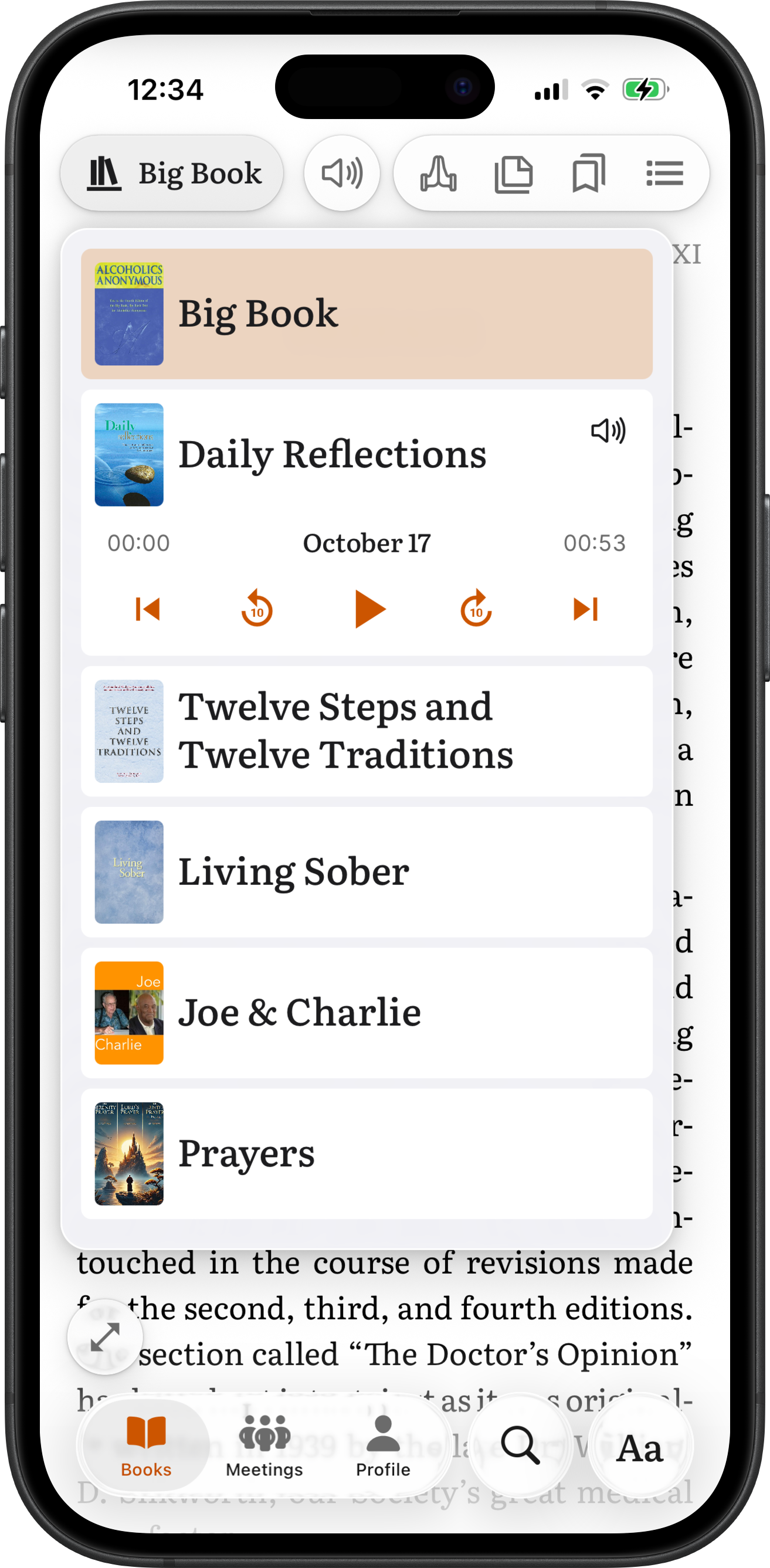
The library holds the Big Book, Twelve Steps and Twelve Traditions, Daily Reflections, Living Sober, the Joe & Charlie Big Book study and a prayer book. You choose which books sit on your shelf in Profile → My Library.
More: Your libraryDaily Reflections by date
Daily Reflections opens on today's reading. A calendar in the book menu opens any other day of the year.
More: Daily Reflections by datePrayers
The prayer book sits one tap away from any book, with the text of each prayer and its audio.
More: PrayersReading appearance
One Aa button sets text size, left or justified alignment, and a light, dark or auto theme. Every change applies right away, in every book.
More: Reading appearanceFull screen
One tap hides everything but the page. Tap an empty spot on the page to bring the controls back.
More: Full screenYour place is kept
Each book reopens where you left it. Bookmarks, notes and highlights are saved to your account and sync across your devices.
Listen
Every book in the library is narrated. The player sits over the page, so you can read and listen at the same time.
Narrated books
Every chapter of every book has audio, and Daily Reflections has a track for each day. The playlist lists every chapter and marks it as not started, part-way with the time left, finished, or playing.
More: Narrated booksFollow audio
As a book is read aloud, the words being read are marked on the page, and the page keeps them in view. Scroll away and it stops following. Tap Sync to bring the page back to the voice.
More: Follow audioTap to play
Tap any word on the page and the narration plays from that word. Undo waits 12 seconds in case the tap was a mistake.
More: Tap to playPlay from here, Play selection
Select a passage and the menu offers two choices. Play from here keeps going past the selection. Play selection reads only the selected words, then pauses.
More: Play from here, Play selectionParagraph stop
The narration pauses at the end of every paragraph, so a group can read a book together at a meeting. Play reads the next paragraph. Replay reads the same one again.
More: Paragraph stopSleep timer
The narration stops by itself after 15 to 90 minutes, at the end of the chapter, or at the end of the next one. A slider sets any time from 5 minutes to 2 hours.
More: Sleep timerKeeps playing
Audio keeps playing with the screen locked or another app open, and you can control it from the lock screen.
Study
Mark the book the way you would mark a paper one.
Bookmarks
A bookmark has a title, notes and a color, so you can sort bookmarks by meeting or by topic. Deleted bookmarks stay in Recently Deleted for 30 days.
More: BookmarksFloating bookmarks
A floating bookmark follows the page you are on, so each meeting you attend can have its own bookmark that moves with the group.
More: Floating bookmarksNotes
Select a passage and add a note. Notes are listed per book and are searchable across every book.
More: NotesHighlights
Highlight or underline a passage in the color you choose, like markers and pens on paper. Deleted notes and highlights stay in Recently Deleted for 30 days.
More: HighlightsCross-references
Every reference in the text is a link. Tap it to jump to the passage, in the same book or another one. A Go Back pill takes you back to where you were.
More: Cross-references
Search
One Search tab for the books, your notes and your bookmarks.
Search the books
Search finds a passage by its meaning as well as its wording, across every book on your shelf or only the ones you pick. Results open on the page.
More: Search the booksSearch notes and bookmarks
The same search looks through your note text, highlighted passages, and bookmark titles and notes, across every book.
More: Search notes and bookmarksGo to a page
Type the page the meeting is on, Roman numerals included. XXV opens The Doctor's Opinion; 86 opens Into Action at that page.
More: Go to a pageFound from the home screen
On iOS, books and chapters show up in Spotlight search and open at the right chapter or track.
Meetings
Online meetings from public third-party meeting directories, filtered to fit your day.
Find a meeting
The Meetings tab lists online meetings from public third-party meeting directories, grouped as in progress, upcoming, and tomorrow.
Filters
Filter by day of the week, time of day or a time range, Open or Closed, format, community, language, features, and the conference platform. Show or hide 24/7 marathon meetings.
Join in one tap
Each meeting shows how to join: a Join button for Zoom, Google Meet, Microsoft Teams, WebEx, Jitsi and others, a Call button for phone meetings, and the meeting's notes.
Favorites
Save a meeting to Your Favorites and see your saved meetings on any day, at any time.
Add to calendar
Add a meeting to your phone's calendar. It repeats every week for a year.
Share or copy
Share a meeting, or copy its name and time, its location, or its full details to send to someone.
Meetings activity
A list in Profile shows what you did with meetings: joined, added to favorites, shared, added to the calendar. The list stays on your device.
Sobriety
Set the date once. The app does the counting.
Sobriety date
Set your sobriety date in Profile. The app shows how long you have been sober in days, weeks, months or years. Setting a date is optional.
More: Sobriety dateHome screen widgets
A widget shows your sobriety time on the home screen and, on iPhone, on the Lock Screen. Tap it to open the app.
More: Home screen widgetsSiri
On iPhone, ask "How long have I been sober in SoberHub?" and Siri answers without opening the app. Press and hold the app icon for Sobriety Time, which opens your count in Profile.
More: SiriMilestone reminders
With notifications on, the app sends a short morning message on round milestones: days, weeks, months and years.
More: Milestone remindersShare a milestone
Share a milestone as a card, with several designs to choose from. The link opens a page on share.soberhub.life.
More: Share a milestone
Drive and voice
The same library in the car and by voice.
CarPlay
On CarPlay the library is laid out for the car. Pick a book and a chapter from the dashboard, or ask Siri. While you drive, the phone shows a reminder to use the car's screen.
More: CarPlayAndroid Auto
On Android Auto, the same books and your recent tracks are on the car's screen, and Google Assistant finds a chapter by voice.
More: Android AutoPlay by voice
Say "Hey Siri, play Bill's Story on SoberHub", "Play Step 3" or "Play today's Daily Reflection". On Android, "Hey Google, play How It Works on SoberHub" does the same.
More: Play by voiceOffline audio
Download a book's audio under Profile → Offline Downloads and it plays without a connection.
More: Offline audio
Languages and offline
Three languages for the books, five for the app.
Books in three languages
The books and their narration come in English, Spanish and French. My Library lets you keep books in more than one language on the same shelf. The Joe & Charlie study is in English only.
App in five languages
The app itself comes in English, Spanish, French, Portuguese and Russian, and follows your phone's language.
Works offline
The books are kept on your phone, so reading works without a connection. Downloaded audio plays offline too.
More: Works offline
Free and private
Free, no ads
There is no price, no subscription, no premium tier and no advertising. SoberHub is a 501(c)(3) nonprofit funded by donations.
More: Free, no adsAccount optional
You can use the app as Anonymous and add an email later, so your bookmarks and notes survive a new phone. You can also sign in with Email, Apple, Google or Facebook.
More: Account optionalYour data stays yours
SoberHub does not sell your data. You can delete your account from inside the app, with 30 days to change your mind.
More: Your data stays yours